Skip to content

Everything Pocketa does

The everyday features, the full set of money tools, and the parts that work for you outside the app. All of it runs offline.

The everyday features

  • Log an expense in seconds

    Amount, category, save. A calculator lives in the keypad, and typing a phrase like “coffee 4.50 yesterday” fills the form for you.

    Expense, income and transfer. Templates for repeat entries. Split one payment across categories.

  • Snap a receipt, skip the typing

    Your phone reads the merchant, total, date and line items. The photo is processed on the device and is never uploaded.

    Works in airplane mode. Category suggested for you. Receipt image kept with the entry.

  • Know what is safe to spend

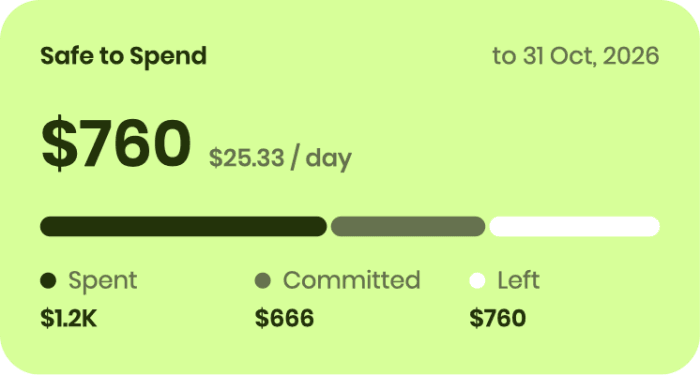
    Safe to spend turns your budget and upcoming bills into one daily number, so you pace the month instead of auditing it afterwards.

    Spent, committed and left at a glance. Alerts before you pass a limit. Forecasts computed on your phone.

  • A home screen you arrange

    Pick from 17 widgets, then hold, drag and drop until the dashboard shows what you care about first.

    Net worth, budgets and upcoming bills. Lock Screen and Home Screen widgets. Six colour themes.

A full set of money tools, built in

Every one of these is built in, works offline and feeds the same budgets, forecasts and reports.

  • Bills and recurring

    Any schedule, posted automatically or after you confirm. Variable bills ask for the real amount first.

  • Savings goals

    A target, a deadline and a finish date projected from what you actually put in.

  • Debt payoff planner

    Snowball or avalanche, with interest accrued daily and a debt-free date for each plan.

  • Loans

    Money you lent or borrowed, with due dates, partial repayments and overdue flags.

  • People and split

    Split a bill into shares, see who owes you, and settle up in one tap.

  • Trips and events

    Set the dates once. Everything you log inside them is tagged to the trip.

  • Exchange rates

    Offline rates you can edit, with history kept so past net worth stays accurate.

  • Categories and tags

    Nested categories with your own icons, plus tags that cut across them.

Useful before you even open it

Widgets on your home screen

Glance at your numbers or add an expense without opening the app, on iPhone and Android. On iPhone they also come to the Lock Screen and StandBy.

  • Safe to Spend
  • Budget Ring
  • Upcoming Bills
  • Goal Progress
  • Debt Payoff
  • Cashflow Forecast
  • Accounts
  • Loans
  • Spend Heatmap
  • Quick Add

Notifications that arrive on time

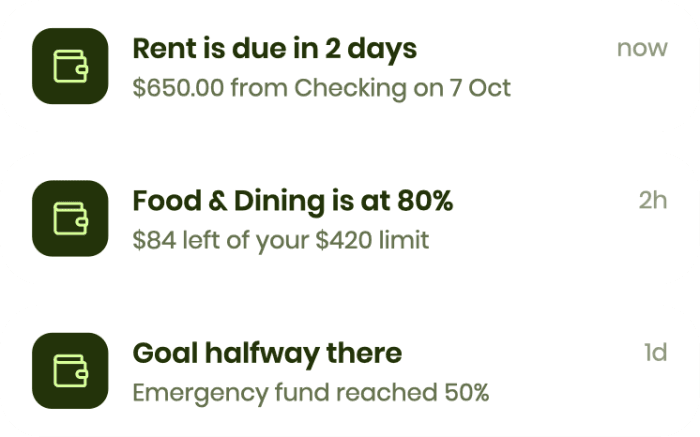
Scheduled on your phone, so they work offline. Each one has its own switch, and all of them are kept in an in-app inbox.

Three Pocketa notifications: rent due in 2 days, a category at 80 percent of its limit, and a savings goal halfway reached
Bill reminders
As many days ahead as you choose, and again on the due day.
Budget alerts
When a category reaches the share of its limit that you set.
Low balance warnings
When the 30-day forecast sees your balance dropping below zero.
Goal milestones
At 25, 50, 75 and 100 percent, and before a target date.
A daily nudge
At the time you pick. It stays quiet on days you have already logged.

Start tracking in about a minute

Get Pocketa